
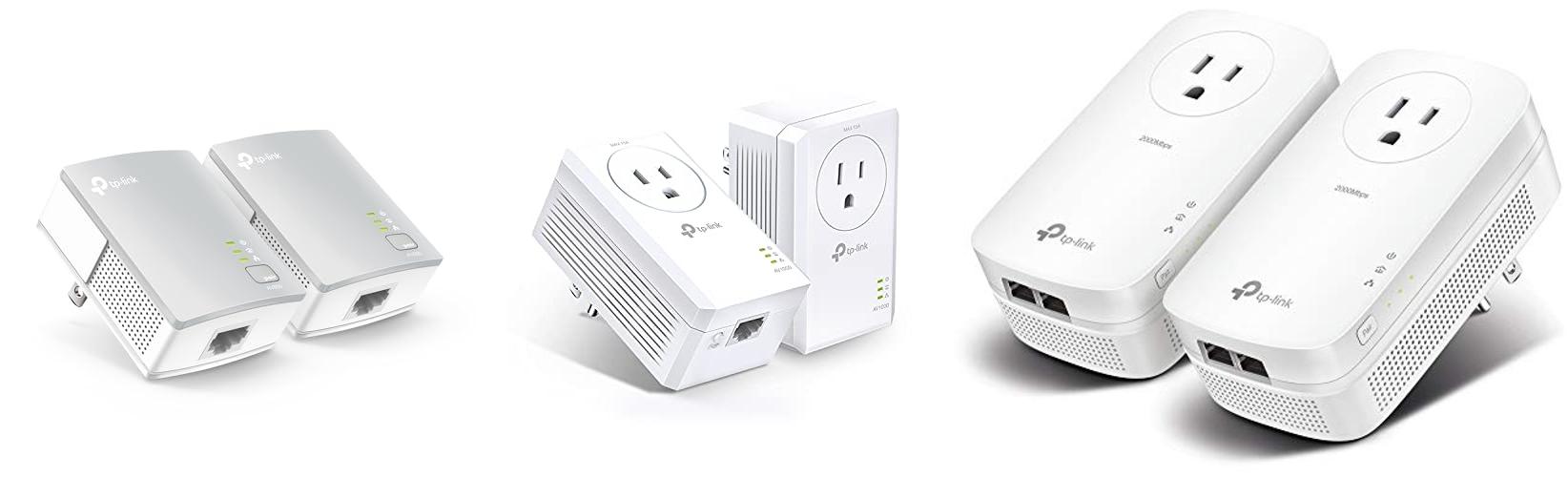
Ever feel like your Wi-Fi signal is playing hide-and-seek? You’re in the living room, and suddenly, your movie starts buffering. Or you’re trying to game upstairs, and your connection drops out. It’s frustrating, right? Many homes have dead zones where Wi-Fi just doesn’t reach well. You might have tried moving your router, but that doesn’t always fix the problem. That’s where a powerline adapter can be a real lifesaver!
But choosing the *right* powerline adapter can feel like another puzzle. There are so many different speeds and features out there. Do you need the fastest one? What do all those numbers even mean? It’s easy to get confused and end up with something that doesn’t quite do the job. Don’t worry, though! This blog post is here to help you cut through the confusion and find the perfect powerline adapter for your home.
By the time you finish reading, you’ll understand exactly what powerline adapters are, how they work, and what to look for when you’re shopping. We’ll break down the important features so you can make a smart choice and finally say goodbye to those annoying Wi-Fi dead zones. Let’s dive in and get your internet connection working smoothly everywhere in your house!
Our Top 5 Powerline Adapter Recommendations at a Glance
Top 5 Powerline Adapter Detailed Reviews
1. TP-Link AV600 Powerline Ethernet Adapter Kit – Gigabit Port

Rating: 8.8/10
Tired of slow internet or Wi-Fi dead zones? The TP-Link AV600 Powerline Ethernet Adapter Kit is a simple solution. It uses your home’s electrical wiring to create a strong wired network. This means you can get fast internet speeds to any room with a power outlet, perfect for streaming movies or playing games online without interruptions. Setting it up is super easy, and the adapters are small enough to fit almost anywhere.
What We Like:
- Fast Speeds: Get up to 600Mbps, which is great for HD and 3D video streaming and online gaming.
- Easy Setup: It’s “plug and play.” Just plug one adapter into your router and the other into the wall where you need internet.
- Network Expansion: It turns your existing electrical wires into a fast network, reaching up to 300 meters.
- Compact Design: These adapters are smaller than many others, so they don’t block other outlets.
- Power Saving: They automatically use less power when not in use, saving energy.
- Compatibility: Works with many other TP-Link Powerline adapters.
- Warranty and Support: Comes with a 2-year warranty and 24/7 tech support.
What Could Be Improved:
- Same Circuit Needed: The adapters must be on the same electrical circuit to work.
- No Wi-Fi: This kit provides wired internet, not Wi-Fi. You’ll need a separate Wi-Fi adapter for wireless connections.
This TP-Link Powerline kit offers a reliable and easy way to boost your home network. It’s a good choice for anyone needing a stable wired connection in rooms far from their router.
2. TP-Link AV1000 Powerline Ethernet Adapter Kit (TL-PA7017P KIT) – Passthrough

Rating: 9.1/10
The TP-Link AV1000 Powerline Ethernet Adapter Kit (TL-PA7017P KIT) offers a simple way to extend your wired internet connection throughout your home using your existing electrical outlets. It’s a great solution when Wi-Fi doesn’t reach every corner or when you need a stable connection for devices like smart TVs or game consoles.
What We Like:
- Extends your Ethernet connection through your home’s electrical wiring, bypassing Wi-Fi dead zones.
- HomePlug AV2 technology provides fast AV1000 speeds, ideal for multi-story homes or hard-to-reach areas.
- Features a Gigabit Ethernet port for fast and secure wired connections to your devices.
- Plug, Pair, Play setup makes it incredibly easy to get started with no complex configurations.
- Includes an integrated power socket with noise filtering, so you don’t lose an outlet.
- TP-Link’s commitment to cybersecurity ensures the device is designed with security as a top priority.
- Power saving mode automatically reduces energy consumption.
What Could Be Improved:
- Adapters must be on the same electrical circuit and plugged directly into wall outlets, not surge protectors.
- Speeds can be affected by the quality of your home’s wiring, distance between adapters, and network interference.
- This kit does not provide Wi-Fi capabilities.
This TP-Link Powerline Ethernet Adapter Kit is a straightforward and effective way to boost your home’s wired network. It’s a solid choice for anyone needing a reliable connection in areas where Wi-Fi struggles.
3. TP-Link AV2000 Powerline Ethernet Adapter TL-PA9020P KIT – Powerline Network Adapter

Rating: 9.0/10
Are you tired of weak Wi-Fi signals in certain rooms? The TP-Link AV2000 Powerline Ethernet Adapter TL-PA9020P KIT is here to help! This kit uses your home’s electrical wiring to create a stable wired network connection, giving you a reliable internet connection where your router or Wi-Fi extender can’t reach. It’s perfect for streaming, gaming, or working from home.
What We Like:
- Extends your network easily: It turns your electrical outlets into Ethernet ports, so you don’t need to run new wires.
- Super-fast speeds: With AV2000 powerline speeds and 2 Gigabit ports, you get a fast and stable connection for all your devices.
- Great for large homes: It works through thick walls and multiple floors, making it ideal for basements, attics, and garages.
- Simple setup: Just plug it in, pair the adapters, and you’re good to go – no complicated setup needed.
- Smart power saving: The adapter automatically uses less power when it’s not in use, saving energy.
- Built-in outlet: Each adapter has an extra power outlet, so you don’t lose a wall socket.
- Secure connection: TP-Link is committed to cybersecurity, so your network is protected.
What Could Be Improved:
- Requires same circuit: Both adapters need to be on the same electrical circuit to work.
- No surge protectors: You must plug them directly into the wall outlet, not a surge protector.
- Speed depends on wiring: Actual speeds can be slower if your home’s wiring is old or has interference.
This TP-Link powerline kit offers a fantastic solution for extending your wired network without the hassle of new cables. It’s a smart and simple way to get a better internet connection in every corner of your home.
4. TP-Link AV1000 Powerline Ethernet Adapter KIT – Gigabit Port

Rating: 9.3/10
Tired of weak Wi-Fi signals or cables that just won’t reach? The TP-Link AV1000 Powerline Ethernet Adapter KIT is your solution. This kit uses your home’s existing electrical wiring to create a stable wired network connection. It’s perfect for areas where traditional Wi-Fi struggles, like basements, attics, or garages. Simply plug them in, and you’re ready to go, extending your internet where you need it most.
What We Like:
- Easy Setup: Just plug them in and they work! No confusing wires or tech skills needed.
- Extends Reach: Connect devices far from your router, even through walls.
- Gigabit Speed: Enjoy fast, reliable wired internet for gaming, streaming, and work.
- Compact Size: These adapters are small and don’t block other outlets.
- Power Saving: They automatically use less energy when not actively transferring data.
- Secure Connection: Creates a private wired network, keeping your connection safe.
- Free Expert Help: TP-Link offers support if you need it.
What Could Be Improved:
- Circuit Dependent: Both adapters must be on the same electrical circuit to work.
- No Surge Protector Use: You can’t plug them into surge protectors, which limits placement options.
- Speed Variations: Actual speeds can be lower depending on your home’s wiring quality and distance.
- No Wi-Fi: This kit only provides wired Ethernet connections; it doesn’t create a Wi-Fi hotspot.
If you need a reliable wired connection in hard-to-reach spots, this TP-Link Powerline Adapter KIT is a fantastic choice. It’s simple to use and effectively extends your network.
5. NETGEAR Powerline Adapter Kit

Rating: 9.1/10
Tired of slow internet in certain rooms? The NETGEAR Powerline Adapter Kit (PLP2000-100PAS) is your solution. This kit uses your home’s existing electrical wiring to bring fast internet speeds to any outlet. It’s a great way to improve your home network without running new cables. This kit is designed for use in the US only.
What We Like:
- Super fast speeds up to 2000Mbps make streaming and gaming smooth.
- It’s incredibly easy to set up; just plug it in.
- The extra outlet with noise filtering means you don’t lose a power socket.
- It has two Gigabit Ethernet ports for wired connections.
- MIMO and Beamforming technology improve signal strength and coverage.
- It works through your home’s electrical wiring, so no new cables are needed.
What Could Be Improved:
- This device is not a Wi-Fi extender; it provides wired connections only.
- Performance can sometimes depend on the quality and age of your home’s wiring.
If you need a reliable way to get fast internet to devices like smart TVs or gaming consoles, this NETGEAR Powerline Adapter Kit is an excellent choice. It offers speed and convenience by using what you already have.
Your Guide to Faster Internet: Choosing the Right Powerline Adapter
Tired of slow Wi-Fi in some rooms? A powerline adapter might be your solution! These clever gadgets use your home’s electrical wiring to send internet signals. This means you can get a stable connection in places where Wi-Fi struggles. Let’s find the best one for you.
What to Look For: Key Features
When you’re shopping for powerline adapters, keep these important features in mind.
- Speed (Mbps): This is how fast the adapter can send data. Look for higher numbers for smoother streaming and faster downloads. Speeds of 1000 Mbps or more are great for most homes.
- Wi-Fi vs. Ethernet: Some adapters just give you an internet port (Ethernet). Others also create a new Wi-Fi hotspot. If you need Wi-Fi in a dead zone, choose one that includes Wi-Fi.
- Number of Ports: Most adapters come in pairs. You plug one into an outlet near your router and another where you need internet. Some kits have more than two adapters.
- Encryption (AES): This keeps your internet connection safe. Look for adapters with AES encryption. It’s like a secret code for your data.
- Passthrough Outlet: Some adapters have an extra plug socket on them. This means you don’t lose an outlet when you plug in the adapter.
Important Materials
Powerline adapters are usually made of sturdy plastic. This keeps the electronics inside safe. The internal parts are like tiny computer chips that handle the internet signal. The quality of these chips matters for how well the adapter works.
What Makes a Powerline Adapter Great (or Not So Great)?
Several things affect how well your powerline adapter performs.
- Quality of Electrical Wiring: This is a big one. Older or complex wiring can slow down the signal. Adapters work best on the same electrical circuit. If the adapters are on different circuits, the connection might be weaker.
- Distance: The farther the internet signal has to travel through your wires, the slower it can get. Try to plug the adapters into outlets that aren’t too far apart.
- Electrical Noise: Other appliances plugged into the same outlets can interfere with the signal. Things like hair dryers or blenders can create “noise” that slows things down. Using a surge protector with a built-in filter can help.
- Firmware Updates: Some adapters can be updated. These updates can improve speed and fix problems. Check if the manufacturer offers these.
User Experience and Use Cases
Powerline adapters are pretty simple to use.
- Setup: You usually just plug them in. One goes near your router, connected by an Ethernet cable. The other goes near your device (like a computer or smart TV) and is also connected by an Ethernet cable. For Wi-Fi models, you set them up like a regular Wi-Fi extender.
- What You Can Do With Them:
- Boost Wi-Fi in Dead Zones: Get internet in your basement, garage, or far corners of your house.
- Connect Gaming Consoles: Enjoy a more stable online gaming experience without lag.
- Stream Movies Smoothly: Watch movies and shows in high definition without buffering.
- Improve Smart Home Devices: Ensure your smart speakers and cameras have a reliable connection.
- Create Wired Connections: Connect devices that don’t have Wi-Fi or need a super stable connection.
With the right powerline adapter, you can say goodbye to frustratingly slow internet in parts of your home.
Frequently Asked Questions About Powerline Adapters
Q: How do powerline adapters work?
A: Powerline adapters use your home’s electrical wires to send internet signals. You plug one adapter into an outlet near your router and connect it with a cable. Then, you plug another adapter into an outlet where you need internet. It’s like sending internet through the power cords in your walls!
Q: Are powerline adapters good for gaming?
A: Yes, they can be! Powerline adapters often provide a more stable connection than Wi-Fi, which is great for online gaming. This can help reduce lag and make your games run smoother.
Q: Will powerline adapters work if the outlets are on different floors?
A: They might. Powerline adapters work best when the outlets are on the same electrical circuit. Sometimes, they can send signals between floors, but the connection might be slower. It’s best to try them and see.
Q: Can I use more than two powerline adapters?
A: Yes, you can. You can buy kits with more than two adapters, or add more adapters to your existing setup. This lets you bring internet to even more rooms.
Q: Do powerline adapters slow down my internet speed?
A: They can. The speed of your internet connection can be affected by the quality of your electrical wiring, how far apart the adapters are, and other electrical devices. However, they are often faster and more stable than weak Wi-Fi signals.
Q: What is “Wi-Fi Clone” or “Wi-Fi Sync” on a powerline adapter?
A: This feature lets the adapter copy your existing Wi-Fi network name and password. This makes it easy to extend your Wi-Fi without having to set up a new network name or re-connect all your devices.
Q: Do I need a special outlet for powerline adapters?
A: No, you can plug them into standard wall outlets. However, it’s best to avoid plugging them into power strips or surge protectors, as this can sometimes weaken the signal. Some adapters have a “passthrough” outlet, meaning you don’t lose the use of the wall socket.
Q: How do I know if my electrical wiring is good for powerline adapters?
A: It’s hard to know for sure without testing. Generally, newer homes with well-maintained wiring tend to work better. You can test the adapters, and if you have problems, you might need to try different outlets or consider other solutions.
Q: Are powerline adapters secure?
A: Most modern powerline adapters use encryption, like AES, to secure your connection. This means your internet signal is protected from being easily accessed by others on your electrical system.
Q: Can I mix and match powerline adapters from different brands?
A: It’s usually not recommended. Powerline adapters are designed to work together within the same brand and often the same model series. Mixing brands might not work or could lead to poor performance.
In conclusion, every product has unique features and benefits. We hope this review helps you decide if it meets your needs. An informed choice ensures the best experience.
If you have any questions or feedback, please share them in the comments. Your input helps everyone. Thank you for reading.

William has over three years of experience in building gazebos. He started AskGazebo.com to assist his clients.